 CANBAN
 // 文档 // 工作流
Workflow YAML 语法与执行语义
Canban 工作流是以 SQLite 为唯一数据源(workflow_sources 与不可变 workflow_revisions)的声明式 YAML 1.2 执行图(当前 CURRENT = 10)。Visual Studio 图形编辑、YAML Source 手写与 Edit with agent 全部经由同一套 Rust 校验与编译引擎发布。
Visual Studio、SQLite 单一数据源与 Stage 投影
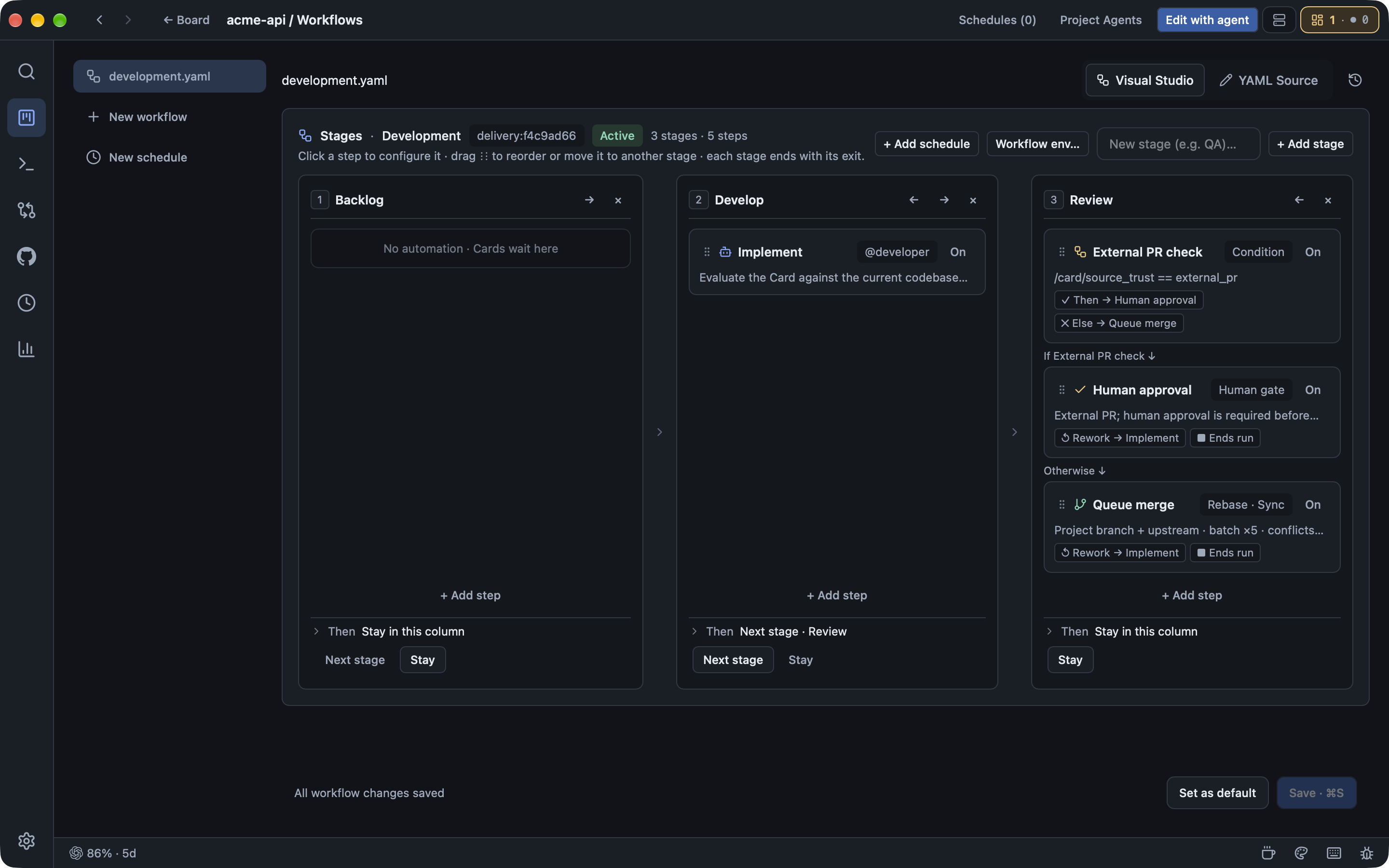
在任意项目顶栏打开 Workflows,即可在 Visual Studio、YAML Source、History 与 Edit with agent 之间切换:
- SQLite 单一数据源:所有工作流源码与不可变修订版本保存在
canban.sqlite(workflow_sources与workflow_revisions)中,不会在~/.canban生成隐藏 YAML 镜像。每个WorkflowRun在创建时冻结当前definition与definition_revision,发布新 YAML 不会篡改正在运行的任务。 - 线性 Schema 迁移(
1..=10):crates/workflow-engine/src/migrations.rs定义BASELINE = 1与CURRENT = 10,解析旧版 YAML 时按顺序自动迁移升级。 - Visual Studio 如何映射到 Stage(
stages.rs):YAML 顶层并没有stages:键;canban_workflow_engine::stages会根据columns、on入列规则和steps中的card.move(column: $next、next: $entry)实时投影出每个看板列的StageView泳道(包含column、name、steps、entry_rule与exit)。Step 上可选写stage: <column_id>显式归属泳道,或写enabled: false在编译期跳过节点而不破坏前后连线。
已校验的 YAML 结构(schema: 10)
YAML 解析使用 serde_yaml_ng,且 Document、Step、WorkflowColumn、WorkflowRule、EventSelector 与 ScheduleCardConfig 均启用了 #[serde(deny_unknown_fields)],任何未定义字段都会在提交校验时被拒绝。
顶层 Document 键(crates/workflow-engine/src/source.rs)
| 键 | 类型与默认值 | 说明 |
|---|---|---|
schema | u32(必填;当前 10) | 工作流 Schema 版本(支持 1..=10 自动迁移到 10)。 |
id | String(必填) | 非空工作流标识(如 delivery:default)。 |
name | String(必填) | 在 Studio 与看板中展示的名称。 |
scope | project(默认)或 global | global(__global)为主机级全局定时/脚本工作流,不包含看板 columns 与 card: 建卡规则。 |
enabled | bool(默认 true) | 控制该工作流源是否参与事件匹配与调度。 |
columns | { id, name } 列表 | 声明看板列(id 允许 ASCII 字母数字、-、_);省略时沿用项目列定义。 |
env | { KEY: VALUE } 映射 | 作用于所有 agent 与 script 步骤的标量环境变量。 |
on | { <rule_id>: WorkflowRule }(非空) | 事件触发规则(event、start_at、match、enabled)或定时调度规则(cron、timezone、overlap、card);亦兼容 GitHub Actions on: { schedule: [{ cron: ... }] } 简写。 |
steps | Step 列表(1..=256) | 有序步骤列表,自动前向边必须构成无环图。 |
workspace | WorkspaceSettings | create_worktree(默认 true)、base_branch、sync_base(要求 create_worktree: true)、remote(默认 origin)。 |
max_steps | u32(1..=1000,默认 100) | 单次 WorkflowRun 允许的最大步骤访问次数上限。 |
on.<rule_id> 触发器与定时规则
- 事件规则:支持
event(如card.column_entered、card.column_left、card.created、card.updated、manual)、start_at(入口步骤 ID)、match(EventSelector,可匹配column、actor、origin、source_kind、reason、changed_fields、repository、subject、reply_to、include_related、include_initial)以及enabled。 - 定时规则:配置
cron(5 段 POSIX Cron 或@hourly/@daily/@weekly/@monthly)即自动视为event: schedule。可选timezone(默认Local,支持UTC、固定偏移+08:00或 IANA 时区名)、overlap(skip默认、queue、allow)与card: { column, title, body }(支持{{date}}、{{datetime}}、{{run_number}}、{{workflow}}、{{rule}}占位符;省略card则以无卡模式执行)。
steps[] 步骤字段
- 通用字段:
id(唯一非空)、name、uses(使用顶层run:简写时可省略)、with、next(除condition与complete外默认指向列表中下一步;card.move可使用$entry)、stage(所属看板列 ID)、enabled(bool,默认true)、on_changes_requested(approval/deliver顶层的打回返工目标)、on_failure(script步骤顶层的首次失败自动跳转目标)。 script专属字段(可置于步骤顶层或with:下,不可冲突):run、shell(默认bash -eo pipefail,回退sh -e)、working_directory(相对卡片工作区的子路径,禁止..)、timeout_minutes(1..=1440)、timeout_seconds(1..=86400)、continue_on_error(默认false)。env:{ KEY: VALUE }映射,仅agent与script步骤允许设置。优先级:宿主与CANBAN_*上下文 < 工作流env<$CANBAN_ENV导出 < 步骤env。
标准默认 development.yaml(default_document)
schema: 10
id: delivery:default
name: Development
enabled: true
columns:
  - id: backlog
    name: Backlog
  - id: develop
    name: Develop
  - id: review
    name: Review
on:
  develop:
    event: card.column_entered
    start_at: agent:develop
    match:
      column: develop
  review:
    event: card.column_entered
    start_at: condition:external_pr
    match:
      column: review
steps:
  - id: agent:develop
    name: Implement
    uses: agent
    with:
      profile: developer
    next: move:develop
  - id: move:develop
    name: Move to Review
    uses: card.move
    with:
      column: review
    next: condition:external_pr
  - id: condition:external_pr
    name: External PR check
    uses: condition
    with:
      pointer: /card/source_trust
      equals: external_pr
      then: approval:review
      otherwise: deliver:review
  - id: deliver:review
    name: Queue merge
    uses: deliver
    with:
      sync_upstream: true
    next: __end
    on_changes_requested: agent:develop
  - id: approval:review
    name: Human approval
    uses: approval
    with:
      title: External PR; human approval is required before merging
    next: __end
    on_changes_requested: agent:develop
  - id: __end
    uses: complete
workspace:
  create_worktree: true
  sync_base: true
  remote: origin
全部 9 种步骤类型(uses:)
uses | with 与步骤参数 | 运行时语义 |
|---|---|---|
agent | with.profile(可选 Profile ID)、with.instruction(省略时解析内置提示词)、env、next | 在卡片独立 Git Worktree 中启动 Agent PTY(waiting_agent);仅在显式执行 canban report --state completed 后推进。 |
script(或 run:) | run、shell、working_directory、timeout_minutes、timeout_seconds、continue_on_error、env、on_failure、next | 通过 Herdr Core 执行命令,不占用 scheduler.max_agents 槽位;读取 $CANBAN_ENV(inputs.env)与 $CANBAN_OUTPUT(outputs.<step_id>)。 |
admit | with.agent_slot(bool,默认 true)、with.max_ready(1..=100,可选)、next | 进入 waiting_capacity;AppServer 在有可用配额时按看板顺序放行。 |
card.move | with.column(列名或 $next)、next(步骤 ID 或 $entry) | 以 origin: "workflow" 移动卡片避免重复触发入列规则;$entry 接续目标列的入口步骤。 |
condition | with.pointer(JSON Pointer)、with.equals(JSON 值)、with.then、with.otherwise | 对 {inputs, outputs, card} 求值并即时分支,忽略 next 字段(编译后无 next,仅通过 then / otherwise 分支)。 |
approval | with.title(非空标题)、on_changes_requested(可选返工目标)、next | 暂停在 waiting_approval 并设置 Card.human_gate,等待人工批准或打回返工。 |
deliver | with.profile(默认 @merger)、with.target_branch、with.strategy(rebase 默认、squash、merge)、with.sync_upstream(默认 true)、with.batch_size(1..=50,默认 5)、with.test_command、with.max_conflict_attempts(默认 3,0 禁用)、on_changes_requested、next | 进入项目串行 FIFO Queue Merge(waiting_delivery);若卡片开启 hold_auto_merge 则先暂停在 waiting_approval。 |
notify | with.message、next | 追加 workflow.notified 时间线事件与通知后继续。 |
complete | *(无)* | 终结节点,将 WorkflowRun 标记为 completed。 |
条件分支(condition)与并发准入闸门(admit)
条件表达式求值(condition)
运行时(crates/workflow-engine/src/runtime.rs)会构造 { "inputs": run.inputs, "outputs": run.outputs, "card": card } 上下文(其中 card.source_trust 由 Card::trust_level() 填充为 "local"、"collaborator" 或 "external_pr"),并用 with.pointer(必须为空或以 / 开头)做 JSON Pointer 查找:
- 匹配规则:除精确 JSON 相等外,字符串
"true"/"false"可匹配布尔值,数字字符串可匹配数字,缺失指针匹配null。 - 外部 PR 安全门禁:
pointer: /card/source_trust搭配equals: external_pr会把外部 PR 路由至approval:review人工审批,本地或协作者任务则进入deliver:review。 - 读取脚本输出:前序
script步骤写入$CANBAN_OUTPUT的KEY=VALUE会存入/outputs/<step_id>/<KEY>,例如pointer: /outputs/script:check/gate、equals: ok。
并发与就绪队列门禁(admit)
admit 校验要求至少启用 agent_slot: true 或 max_ready: 1..=100 之一(definition.rs)。到达闸门的任务进入 waiting_capacity,由 AppServer 准入泵(canban_scheduler::admissions)严格按该列的看板顺序放行:
agent_slot: true(默认):等待全局自动 Agent 并发预算(scheduler.max_agents,默认8)有空余槽位后再推进。max_ready: K:限制已通过该闸门并停留在当前列的就绪卡片上限(例如在Backlog限制最多2张已规划待开发卡片)。canban card adopt:在已有活终端会话中接管阶段时(start_adopted),会绕过admit排队以免正在交互的终端被阻塞。
静态校验、返工循环与失败处理
发布前校验(definition.rs)
validate_definition 会在保存或发布前校验列名、Profile ID、跳转目标、sync_base 前置条件(create_worktree: true)、working_directory 相对路径安全边界,并拒绝 next、condition.then、condition.otherwise 构成的任何自动环路。
返工与失败回退边
工作流中的循环只能通过显式决策或失败边触发:
- 人工打回返工(
on_changes_requested):仅approval与deliver步骤支持(编译为rework)。人工选择 Request changes(workflow.decidedecision: "rework")会清除human_gate、将意见写入inputs.rework_feedback并跳回目标步骤(如agent:develop)。 - 脚本单次自动回退(
on_failure):当script步骤非零退出且continue_on_error: false时,fail_script会记录退出码与日志尾部反馈(rework_origin: "script_failure"),并在单次运行内最多自动跳转一次到on_failure(script_failures[step_id] == 0);连续第二次失败或未配置on_failure时暂停在waiting_approval等待人工 Retry、Rework 或 Stop。 - Agent 显式上报与内容过期保护:终端退出或空闲绝不推进
agent步骤。canban report --state completed推进下一步;blocked/failed进入blocked状态;backlog取消当前运行;中途修改卡片正文会触发input_digest校验并标记为stale。
串行 FIFO Queue Merge(deliver)
进入 deliver 后,Canban 会按严格顺序串行集成并行卡片分支,彻底消除目标分支并发竞争:
- 严格 FIFO 排队:按
(inputs.queued_at, storage_index)顺序从队头提取最多batch_size(1..=50,默认5)张配置兼容的waiting_delivery卡片,合入项目级批量工作树<home>/worktrees/<project-ns>/_merge_queue。 - Turn 收尾等待窗口:若 Agent 在 Turn 结束前提前上报
completed,Canban 会等待其 Turn 稳定收尾(最长 3 分钟宽限窗口)后再执行 Git 集成。 - 批量集成与单次验证:按
strategy(默认rebase,可选squash或--first-parentmerge)集成;若配置了test_command,则对集成后的批量工作树执行一次测试(未配置则跳过)。 - 单次快进、推送与归档:验证通过后一次性快进目标分支,在
sync_upstream: true时推送远端,并在保存refs/canban/cards/<card-id>后自动归档卡片。 - 冲突与失败自愈(
@merger):发生冲突或批量测试失败时,Canban 写入安全引用refs/canban/batch/<short_id>/{target,card-<N>}、将运行置为waiting_batch,并仅唤醒一个项目级@merger会话在_merge_queue中修复或通过canban batch report --state completed --evict <CARD_NUMBER>剔除问题卡片;无test_command的单卡合入则在原卡片工作树重试冲突修复(最多max_conflict_attempts次,默认3,0禁用)。
通过 CLI 管理工作流
在命令行中查看实时 Schema、导出、校验与提交 YAML,或设为新建项目的全局默认模板:
canban call workflow.schema '{}'
canban workflow sources --project-id <PROJECT_ID>
canban workflow export --project-id <PROJECT_ID> --name development.yaml --output development.yaml
canban workflow submit --project-id <PROJECT_ID> --revision <REVISION> --file development.yaml --check
canban workflow submit --project-id <PROJECT_ID> --revision <REVISION> --file development.yaml
canban workflow set-default --project-id <PROJECT_ID>
关于 --global 工作流、schedule 命令以及 --human 输出格式,请参阅 Canban CLI、Agent 优化与 --human。